
Payroll Department

We are pleased to offer you the option to receive your W-2 and 1095 forms electronically. This method is secure, environmentally friendly, and allows you to access your W-2 and 1095 forms more quickly and conveniently.
To consent to receiving your W-2 and 1095 forms electronically, please read the following information and provide your consent by electronically updating your tax delivery options.
Electronic Delivery of W-2 Forms:
Access and Security: Your W-2 and 1095 forms will be available through our secure employee portal. You will need your login credentials to access the portal.
Notification: You will receive an email notification when your W-2 form is available for download.
Duration of Consent: Your consent will remain in effect until you update your delivery preferences in ESS.
Withdrawal of Consent: You may withdraw your consent at any time by notifying the Payroll department in writing. Upon withdrawal, you will receive future W-2 forms in paper format.
Consent:
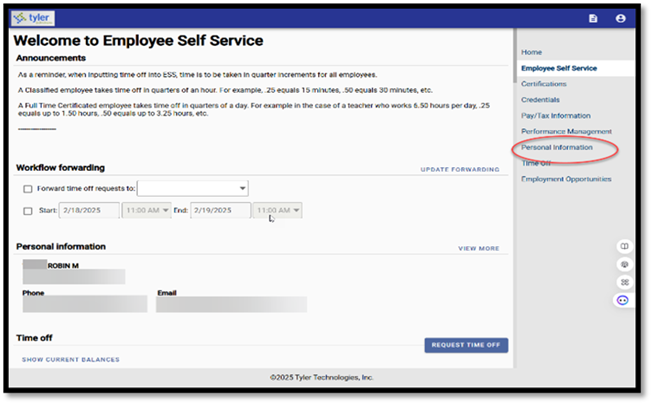
Please visit Employee Self Service (ESS) to sign up for electronic delivery of your W-2. After logging in click Personal Information.
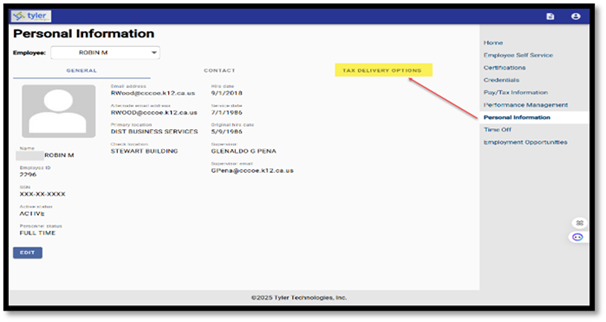
Click Tax Delivery Options
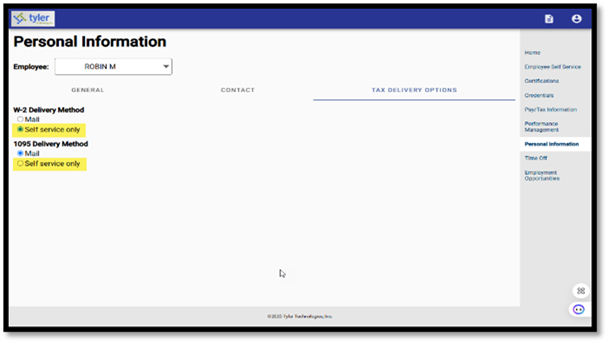
Select Self service only for the W-2 and 1095 Delivery Methods
By updating your ESS tax delivery options, you have electronically consented to receive your W-2s and 1095s electronically.
If you have any questions or need assistance, please contact the Payroll department at (925)779-7500 extension 52200 or you can send us an email at payroll@antiochschools.net.
Thank you for your cooperation.
Sincerely,
AUSD Payroll
(925) 779-7500 x 52200
Meet the Team
Payroll Department
925-779-7500 ext. 52200
Fax: 925-779-7510
Cynthia Rodrigo
Supervisor - Payroll
925-779-7500 ext. 42069
Amanda Ferguson
Payroll Technician
925-779-7500 ext. 42706
Crysten Horrick
Payroll Technician
925-779-7500 ext. 40808